 Anvil Tools
Use temporary email only for authorized testing of an application you own or have permission to test, or for a non-sensitive message when the receiving service permits disposable addresses. It is not an account-recovery, anonymity, or identity-verification bypass service. Respect address restrictions; if a service rejects disposable mail, use an accepted address rather than trying other domains to evade its rules.
Do not use temporary inboxes for account recovery, identity bypass, fake accounts, trial abuse, ban evasion, repeated registrations, spam, or sensitive information. Receiving-service rules apply to every permitted delivery test.
An email address often becomes the recovery route for an account. Choose it according to how long you need access. A purchase, ongoing subscription, work account, or service you need later deserves an address you control over time.
This guide uses Temporary Email to explain a permitted receiving workflow, delivery problems, and the point at which an alias or permanent mailbox is a better choice. The tool receives messages through a third-party mail provider. Website access expiry does not establish deletion of messages or operational records at that provider.
Choose an address by the consequence of losing it
Before choosing an address, ask what would happen if you could never receive another message there. If the answer includes losing an account, missing a payment notice, or being unable to obtain support, use a durable mailbox.
| Situation | Practical choice | Reason |
|---|---|---|
| One-time public resource, where disposable mail is allowed | Temporary inbox | You need one message and no continuing account access |
| Newsletter you intend to keep reading | Managed alias or dedicated mailbox | You can receive future issues and manage subscriptions |
| Paid trial or recurring subscription | Durable mailbox or an alias you maintain | Billing, cancellation, and recovery messages may arrive later |
| Store purchase, warranty, or delivery updates | Durable mailbox | The transaction continues beyond the first confirmation |
| Work, financial, medical, or identity-related account | Your appropriate permanent mailbox | Loss of access can have serious consequences |
| Testing email receipt in an application you own or are authorized to test | Test mailbox, alias, or disposable inbox as permitted | The test has a defined owner, purpose, and cleanup plan |
A managed alias usually forwards to an existing mailbox and can remain available while you maintain it. It lets you separate senders without giving up the destination mailbox. A secondary mailbox provides a separate inbox but still needs passwords, recovery settings, and regular attention. Neither is automatically permanent: check the provider's rules and keep account access current.
A temporary address can keep permitted test messages separate from your everyday mailbox. It does not prevent the receiving application from seeing other information you provide, and it does not prevent ordinary browser or connection records. Treat 'keeps test messages separate' and 'makes me anonymous' as different claims.
Understand what this tool keeps and what it cannot promise
Anvil's temporary-mail page creates an inbox through Guerrilla Mail via the site's backend. The browser receives an inbox capability used to request messages. Provider session details stay on the backend. The page stores the capability in tab session storage so it can attempt to resume the same inbox while the service still recognizes it.
Refreshing the tab can restore an active inbox. Generating a new address abandons access to the old one from this interface. Clearing session storage, closing the session, or provider expiry can also end access. None of those events proves that provider-held messages, sender copies, or operational records have been deleted everywhere. Read the site's privacy policy and the provider's published practices when retention matters.
The page is built for receiving mail; it does not provide a normal outgoing mailbox or a durable recovery account. Do not send private documents, passwords, financial information, or sensitive correspondence to it. Even an ordinary confirmation link can confer access to an account, so use a permanent address for accounts that contain information you need to protect.
Follow one receiving workflow from address to exit
Use a form and service you own or are authorized to test, with synthetic accounts and no real recovery credentials. For a one-time non-sensitive message, check that the receiving service permits disposable addresses. If it requires a durable address or rejects disposable domains, use an allowed alternative.
- Open Temporary Email and wait until a complete address appears.
- Copy the address and compare it with the email field in the authorized test form before submitting.
- Keep the inbox tab open and wait for the expected message. Use Refresh inbox if needed.
- Check the subject and sender before opening the message. Inspect any destination link before following it.
- Check the expected non-sensitive message and record the result of the permitted delivery test.
- Save the information you are entitled to keep before using New address or ending the session.
The example below shows the real inbox interface after address creation. Creating an address establishes that the page and provider can allocate an inbox; it does not establish that another service can deliver to it. A welcome message supplied by the provider is also different from an independently delivered test message.
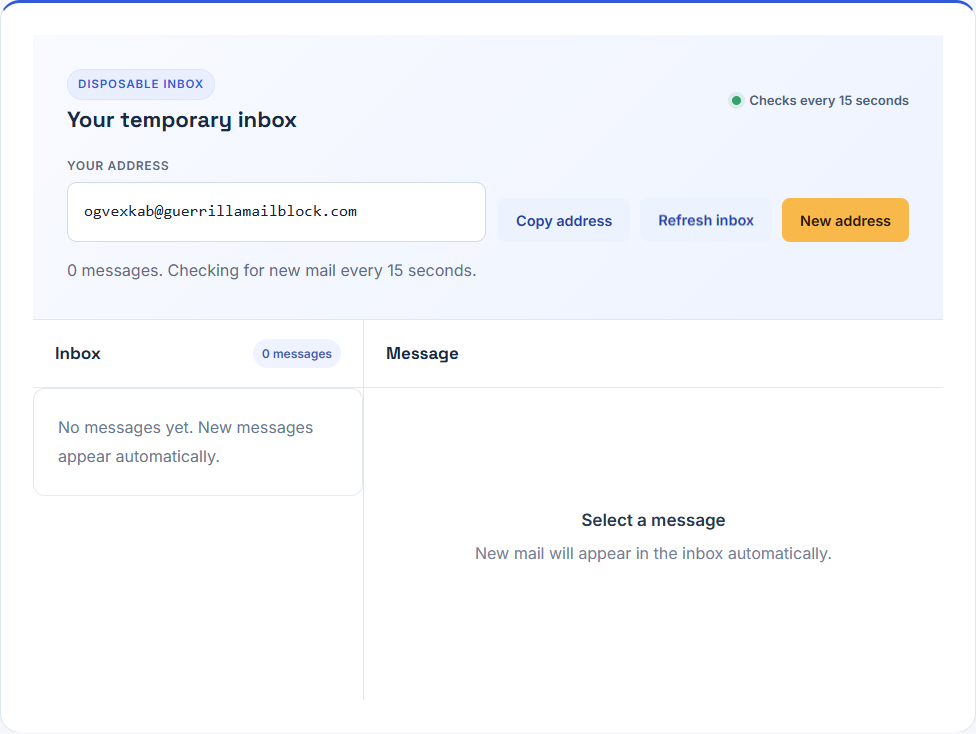
Do not treat Copy address feedback as proof that the receiving application accepted the value. Inspect the submitted form's success or error state. Likewise, an empty inbox is not proof that the sender never sent a message. Delivery, address acceptance, message expiry, and the page's ability to retrieve mail are separate stages.
Use a small test record to locate delivery problems
For a permitted delivery test in an application you own or are authorized to test, record the expected subject, the approximate send time, and the visible result. Use invented names and sample data. Do not paste a live recovery link or inbox capability into a public bug report. Those values may allow someone else to act on the message or read the inbox.
A sample test plan for a form you own might be:
| Step | Expected observation | What a different result suggests |
|---|---|---|
| Create inbox | Complete address and enabled controls | Address allocation or connection problem |
| Submit the form once | Form accepts the address and confirms submission | Validation, rate limit, or form failure |
| Wait and refresh | Expected subject appears in the list | Delivery or retrieval needs investigation |
| Open the message | Expected plain text and recognizable sender | Rendering, wrong template, or wrong destination |
| Check the test workflow | Your application records the intended delivery result | Unexpected content or application-state failure |
This table is a plan, not a claim that an external delivery test has passed. To establish delivery, the application's operator must send a non-sensitive message from an authorized source and verify that it arrives. Keep that result separate from local tests that simulate messages or test the rendering code.
Troubleshoot within receiving-service rules
If the form rejects the address immediately, read its error message. It may block disposable addresses or require another format. Respect that requirement. Do not rotate domains to evade the service's restrictions or use a new inbox to claim repeated trials or benefits.
If the form reports success but the inbox is empty, check the exact address first. A copied space, missing character, or newly generated inbox can send you to the wrong destination. Check whether the page still displays the original address and whether Refresh inbox reports a connection problem. Wait according to the sender's instructions; do not create repeated registrations or requests to evade its limits.
Where you operate the sending application, check its own mail-delivery records for a rejection, deferral, or provider error. A 'queued' application response is not the same as acceptance by the destination mail server. Temporary mail cannot diagnose a sending service's private delivery pipeline; the operator needs those records to distinguish the stages.
If an expected test message expires, use the receiving application's documented test workflow while you still control the address. Avoid repeated requests without knowing their status. If the inbox has been replaced or expired, do not assume it can be recovered. For an important account, contact the service through its normal recovery process and use an address that can remain available.
Read incoming messages as third-party content
A message visible in the inbox is content supplied by its sender. It is not an endorsement by Anvil. A familiar subject or display name can be misleading; inspect the sender and the destination service before following a link. Unexpected requests for credentials, payments, or private documents should not become part of a permitted delivery test.
This interface displays message text rather than treating arbitrary email markup as trusted page content. That reduces exposure to embedded scripts or remote content in the reader, but it does not make every linked website safe. A visible URL can still lead to a different service from the one you intended to use. Navigate to a known service directly when a message is unexpected.
Keep support examples small. Report 'the expected subject did not appear after the form confirmed sending' with an approximate time and browser information. Replace addresses, tokens, and private message contents with sample values. If support needs a reproduction, use a test form and non-sensitive message instead of forwarding a real password-reset email.
Move continuing accounts to a durable address
Use a durable address from the outset for any account that needs lasting access. If an authorized test account will be retained, use your application's documented process to assign an appropriate maintained address while access is available. Check where future notices will go. Do not depend on an expiring inbox for account recovery.
For a subscription, verify where renewal receipts and cancellation confirmations will arrive. Deleting access to a temporary inbox does not cancel an account or stop a payment. Complete cancellation through the service's documented process and retain the confirmation in a durable place when needed.
For an ongoing newsletter, consider a managed alias that you can disable later while retaining your main mailbox. For a long-lived testing program, a controlled test mailbox can make repeated checks easier to reproduce. Choose the setup that matches the duration and consequences of the task, then maintain it.
Leave the session with a clear result
Before ending the session, confirm that the one-time task is complete and no important recovery route depends on the address. Save any permitted download and remove disposable addresses from accounts that have become important. Treat New address as a change of access, not as a universal deletion or cancellation control.
A useful temporary-mail workflow has a narrow purpose, a known lifetime, and a tolerable consequence if access ends. When those conditions no longer apply, a durable mailbox or maintained alias is the practical choice. That keeps the convenience of disposable mail from turning into a future recovery problem.
Check the provider practices directly
Guerrilla Mail’s About page and FAQ describe retention, inbox-identifier access, and privacy practices. Read its terms. The provider describes one-hour message retention; this website’s countdown measures expiry of its own inbox-access capability. One timer does not certify deletion by the other service.
Record delivery in three stages: the sending application’s acceptance, arrival in the temporary inbox, and reading the expected sender, subject, and text. An address or provider welcome message does not prove external delivery. Send only an authorized, non-sensitive test from a mailbox or application you control.