 Anvil Tools
Start with the value you are trying to preserve
A search parameter can look correct in an address bar and still arrive with the wrong value. A literal plus may become a space, an ampersand may create another parameter, or an already encoded percent sign may acquire another layer. The useful question is whether the receiving parser recovers the exact value you intended.
We tested fifteen inputs in the actual Anvil Tools URL Encoder & Decoder, then checked selected results with the browser's query parser. Chrome and Edge both produced the results below on October 7, 2026. These are synthetic examples, not requests to a live API. Download the case definitions, recorded results, and actual tool screenshot.
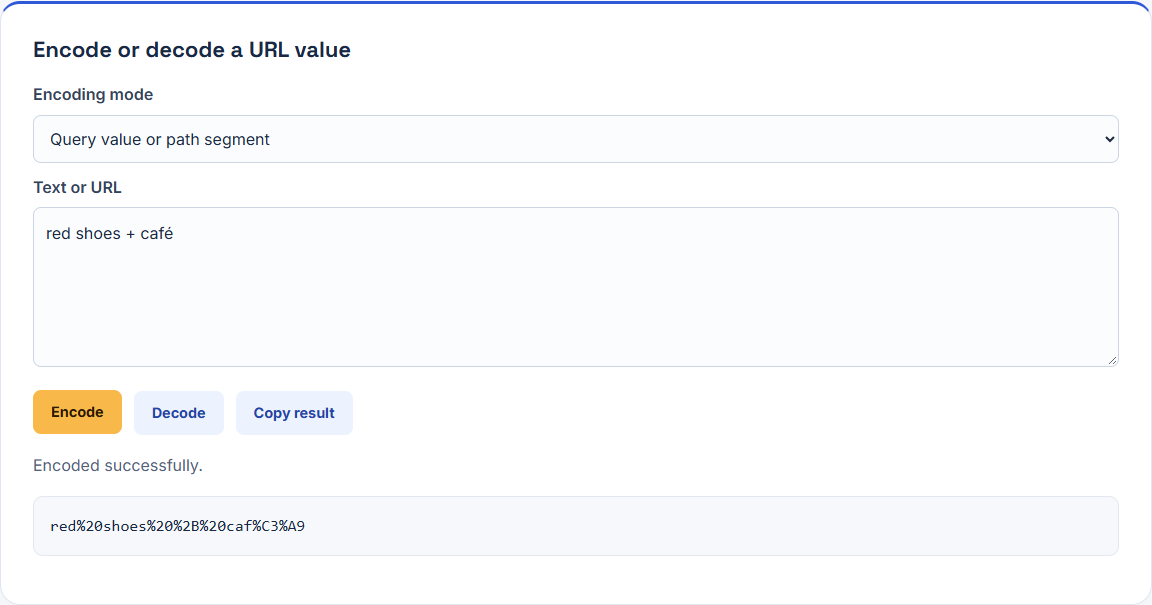
Our main sample is red shoes + café. It contains three problems worth separating: spaces, a literal plus sign, and a character that needs more than one UTF-8 byte. In Query value or path segment mode, Encode returned:
red%20shoes%20%2B%20caf%C3%A9The right result depends on the boundary. One parameter value, a complete URL, and a serialized form-query string are different inputs to different operations.
Choose the right encoding boundary
| What you have | What to do | What to inspect |
|---|---|---|
| One raw query value | Use component mode, or pass the raw value to URLSearchParams | Decoded value equals the original |
| One raw path segment | Use component mode if the route expects one segment | Slash and fragment characters stay inside that value |
| A complete URL | Use complete-URL mode when preserving URL separators is intended | Parameter names, values, and fragment are still correct |
| An already encoded value | Establish whether the next layer expects raw or encoded input | Avoid accidentally encoding the percent sign again |
| A complete form-query string | Parse it as a query string | A plus can represent a space; repeated keys need separate handling |
The tool's modes use the browser's encodeURIComponent and encodeURI families. The component function escapes separators that would otherwise divide a value. The whole-URL function deliberately preserves URL structure. See the component-encoding documentation and whole-URI documentation.
Do not encode a complete URL as though it were one parameter unless you are deliberately placing that URL inside another URL's parameter. In that nested case, the outer boundary needs its own encoding; the two layers are intentional and should be decoded by the corresponding layers.
A plus sign is not always a space
Our component Decode test used a+b%20c. The result was a+b c: the literal plus stayed a plus, while %20 became a space. Using a%2Bb%20c produced the same decoded result.
We then parsed q=a+b%20c with URLSearchParams. Its q value was a b c. Parsing q=a%2Bb%20c returned a+b c. Those operations have different semantics; a successful decode in this tool does not establish what a form-query parser will return.
The URLSearchParams documentation describes form-query serialization, where a space becomes + and a literal plus is percent encoded. Our browser check confirmed this round trip:
const params = new URLSearchParams();
params.set("q", "red shoes + café");
params.toString();
// q=red+shoes+%2B+caf%C3%A9

new URLSearchParams(params.toString()).get("q");
// red shoes + café
Pass a raw value to set or append. Pre-encoding that value makes its percent signs ordinary input to a second encoder. For example, appending red%20shoes would preserve the literal percent sequence as data rather than treat it as an already serialized space.
For an API integration, record the raw value, the transmitted query string, and the server's parsed value. Comparing only the first two can miss a parser mismatch.
Whole-URL mode can leave a broken query intact
This input was accepted in Complete URL mode:
https://example.com/search?q=tea & coffeeEncode returned:
https://example.com/search?q=tea%20&%20coffeeThe ampersand remained a separator. Parsing that address produced two entries: q with value tea , and a second key coffee with an empty value. The intended value tea & coffee did not survive.
This is why whole-URL mode is not a repair step for a URL assembled from unescaped values. Construct the query from raw values instead:
const url = new URL("https://example.com/search");
url.searchParams.set("q", "tea & coffee");
url.searchParams.get("q");
// tea & coffee
Use the tool's component mode to inspect one value. Use a URL parser to inspect the completed address. Encoding and parsing answer different questions.
Fifteen recorded cases and their results
| Test | Mode and action | Observed result |
|---|---|---|
red shoes + café | Component Encode | red%20shoes%20%2B%20caf%C3%A9 |
a+b%20c | Component Decode | a+b c |
a%2Bb%20c | Component Decode | a+b c |
%20 | Component Encode | %2520 |
%2520 | Component Decode | %20, rather than a space |
reports/2026 #1 | Component Encode | reports%2F2026%20%231 |
| Full address with spaces and a literal plus | Complete URL Encode | Spaces escaped; URL separators and plus preserved |
tea & coffee=2 | Component Encode | tea%20%26%20coffee%3D2 |
Full address containing raw tea & coffee | Complete URL Encode | Ampersand remained a parameter separator |
%2F%3F%26%3D%23 | Component Decode | /?&=# |
%2F%3F%26%3D%23 | Complete URL Decode | Reserved escapes remained encoded |
!~*'() | Component Encode | These characters remained unchanged |
%ZZ | Component Decode | Error; previous output cleared |
%C3 | Component Decode | Error; previous output cleared |
你好 🙂 | Component Encode | %E4%BD%A0%E5%A5%BD%20%F0%9F%99%82 |
The fixtures contain the complete input and output strings, including the full-address examples shortened in this table. Selecting the mode is part of reproducing a result. The table is a record of these inputs, not a claim that every URL or receiving framework behaves identically.
Detect double encoding before changing it
Encoding %20 returned %2520: %25 is the encoded percent sign. Decoding %2520 once returned %20. The result did not become a space until a second decoding boundary was applied.
That pattern can reveal accidental repeated encoding, but %25 is not proof of a bug. A value may intentionally contain a literal percent sign, or an outer URL may intentionally contain an encoded inner URL. Read the contract for that boundary before changing the value.
Avoid a “decode until it stops changing” repair. It can turn data into separators and change which value a system interprets. Decode only the layer your application owns, then compare with an explicit expected value. Keep a small synthetic failing example in your debugging notes.
Unicode uses bytes; malformed input needs an error
In our sample, é became %C3%A9. The Chinese text and emoji case required several UTF-8 byte escapes. Counting the visible characters does not predict the length of the serialized URL.
The %C3 case supplied an incomplete UTF-8 sequence, while %ZZ supplied an invalid hexadecimal escape. Both showed “This value contains malformed percent encoding or invalid UTF-8.” Both cleared an earlier valid result. We deliberately seeded a previous result before each failure to check that stale output would not be mistaken for a successful decode.
Repair malformed data at its source when possible. Replacing an invalid escape with an arbitrary character may produce a valid string with the wrong meaning. If you report an error, include the mode, action, expected value, and a sanitized fixture.
What this tool does not validate
This tool transforms text; it does not establish that a destination is trustworthy, that a redirect is permitted, or that an API accepts a request. Component encoding also left !~*'() unchanged in our test. Protocol-specific signing or serialization rules may require their own representation; use the relevant specification rather than assuming every context uses this function unchanged.
The transformation happens in the browser. Loading the page and its assets still involves network requests. Use synthetic values when reproducing a bug, and omit live tokens, private redirect links, and personal data from support messages. See the Privacy Policy.
Repeat the experiment and finish with a parsed value
- Download a case definition and select its exact mode.
- Paste its input into the URL tool and choose Encode or Decode.
- Compare the complete result or error with the recorded fixture.
- For a query example, parse the completed address using the receiving system's parser or a controlled equivalent.
- Compare the parsed value with the original raw value, including spaces, plus signs, accents, and separators.
The release test covered fifteen tool cases and additional query-parser checks in Chrome 154 and Edge 154 on Windows. It did not send requests to an external service, exercise every framework, or measure a URL-length limit. The downloadable result file records the exact browser versions.
For the surrounding debugging workflow, see Debug API Data with JSON, Base64, and Browser Tools. If a serialized payload changes unexpectedly, the SHA-256 text experiment shows why byte-level comparison needs a separate check.